The anchor of coordinates: the power of the absolute given
There is a world of difference between asking the AI to generate “a city on the coast” and providing it with exact GPS coordinates. When we enter the coordinates, something magical happens in the gears of our AI. Gemini stops “inventing” in a generic way and moves on to absolute reference.
Use that data as an anchor to go and check the real data of that specific location on the web: orography, local architectural coherence, native vegetation and even the typical climate.
We go from “it looks like a real place” to “it’s exactly that place, but seen better”. The image we upload becomes a rigid geometric mask, while the coordinates provide the soul and context.
A case study: the waterfront of Alassio
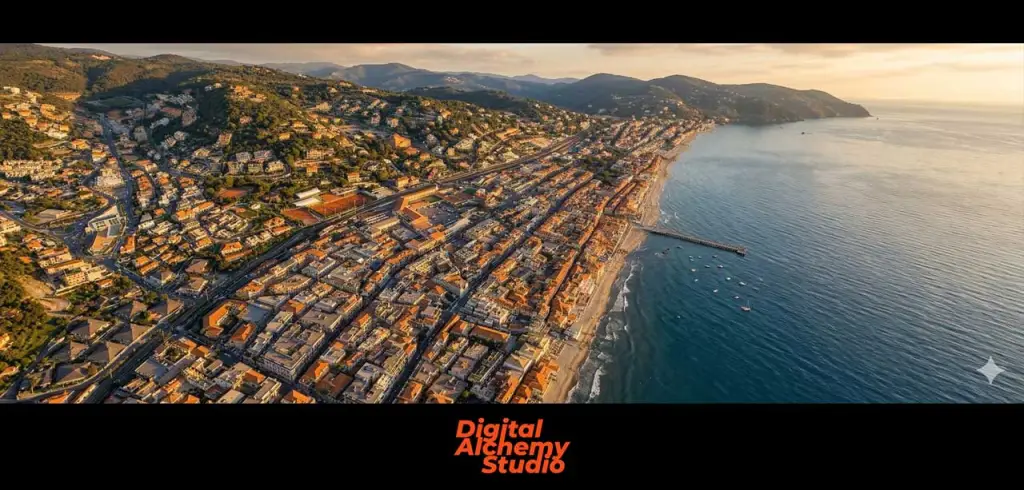
To understand the power of this method, as always I give you an example. Let’s see what happens when we apply the workflow to a simple satellite screenshot.
The method: the prompt to “instruct” the virtual drone
Here’s the optimized prompt I used for the example above. It is structured to give precise orders on the physics of light and spatial coherence.
Prompts to copy and use:
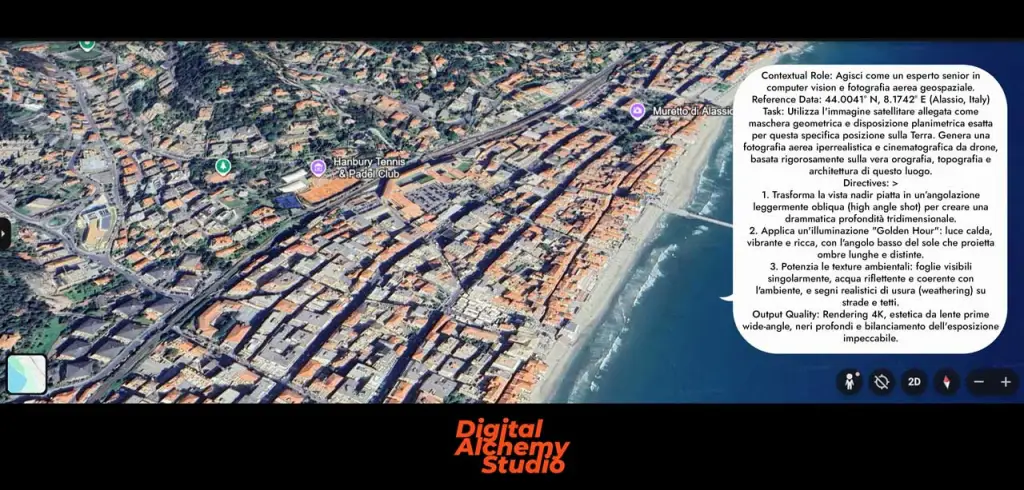
Contextual Role: Act as a senior expert in computer vision and geospatial aerial photography.
Reference Data: 44.0041° N, 8.1742° E (Alassio, Italy)
Task: Use the attached satellite image as a geometric mask and exact planimetric layout for this specific location on Earth. Generate hyper-realistic and cinematic aerial drone photography, strictly based on the true orography, topography and architecture of this place.
Directives: 1. Transforms the flat nadir view to a slightly oblique angle (high angle shot) to create dramatic three-dimensional depth. 2. Apply “Golden Hour” lighting: warm, vibrant, rich light, with the low angle of the sun casting long, distinct shadows. 3. Enhance environmental textures: individually visible leaves, reflective water consistent with the environment, and realistic signs of wear (weathering) on roads and roofs.
Output Quality: 4K rendering, wide-angle prime lens aesthetics, deep blacks and impeccable exposure balance.
Why does this workflow change everything?
Going from a flat screenshot to this quality is not just an aesthetic quirk. For us designers it means moving from simple users to true creative directors:
- Total control: the floor plan remains very similar to the real one; we greatly reduce hallucinations and streets/buildings that don’t exist.
- Resource Efficiency: Instead of “burning” credits with blind attempts in the Pro model, we use geospatial logic to get it right the first time.
- Impact: we sell the atmosphere of a project inserted in its true context, with the perfect light (that “calm opulence” that only a well-guided rendering can provide).
Try entering the coordinates of your next project and try to test how with this prompt we can obtain very interesting results of aerial views. Happy rendering and see you next time!
The weekly column “Architectural Prompting” is edited by experts Luciana Mastrolia, Giovanna Panucci and Andrea Tinazzo
>> If you are interested in these topics, also sign up to the free Linkedin Newsletter AI & Design for Technicians, we’ll talk about it here!