

You know that moment when you need a model of a real building – perhaps just for a volumetric test or an overall view – and you find yourself thinking: “If only I could extract it from Google Earth”? Well, today you can. We are not talking about a perfect metric survey, but about a small flow that in ten minutes gives you a textured mesh, which can be imported into various modeling software, starting from simple screen shots.
The path I followed is this: capture some views from Google Earth, pass them to Nano Banana to get a clean and coherent isometric view, and then let Hunyuan 3D reconstruct the actual model. The last step is to export the 3D file and open it in your favorite software. Let’s see the whole process.
>> Do you want to stay updated and receive articles like this? Click here, it’s free
1. Capture views in Google Earth
Open Google Earth and frame your subject in 3D view. Take several images from different angles – six, eight, ten – going around them as if you were doing a small photographic survey. Avoid items that hide volume. It is important to keep the room more or less the same height, because it will help the subsequent steps to understand the real proportions of the building.
2. Create the isometric image with Nano Banana
Log in to Google AI Studio and choose the Nano Banana model (gemini-2.5-flash-image). Upload images and write this prompt:
Turn these images into a 3D isometric model. Keep it clean and accurate, no background.

Within a few seconds you will get a clean isometric image, without background, where the building emerges in a coherent and recognizable way. Download it: it will be the basis of the model.

3. Rebuild the 3D model with Hunyuan
Open your browser and go directly to 3d-models.hunyuan.tencent.com. The site is in Chinese, so you should activate the automatic translation into English or Italian (you can do it from the browser menu). To log in, enter your email and wait for the verification code that will arrive via email – if you don’t see it immediately, also check your Spam folder.
Once logged in, you will find yourself directly in the main interface, where you will have to select the “Single picture” mode: from here you can load the image generated with Nano Banana and set the parameters for reconstructing the model.
For a good balance between detail and calculation times, I recommend selecting 300,000 faces. If you want to go further, you can try with 500,000 – the result will be more precise in details, especially in complex geometries, but it will take a few more minutes.
Leave the Geometry + Texture type active, so that both the mesh and the material map are generated.
For a good balance between detail and calculation times, I recommend selecting 300,000 faces. If you want to go further, you can try with 500,000 – the result will be more precise in details, especially in complex geometries, but it will take a few more minutes.
Leave the Geometry + Texture type active, so that both the mesh and the material map are generated.
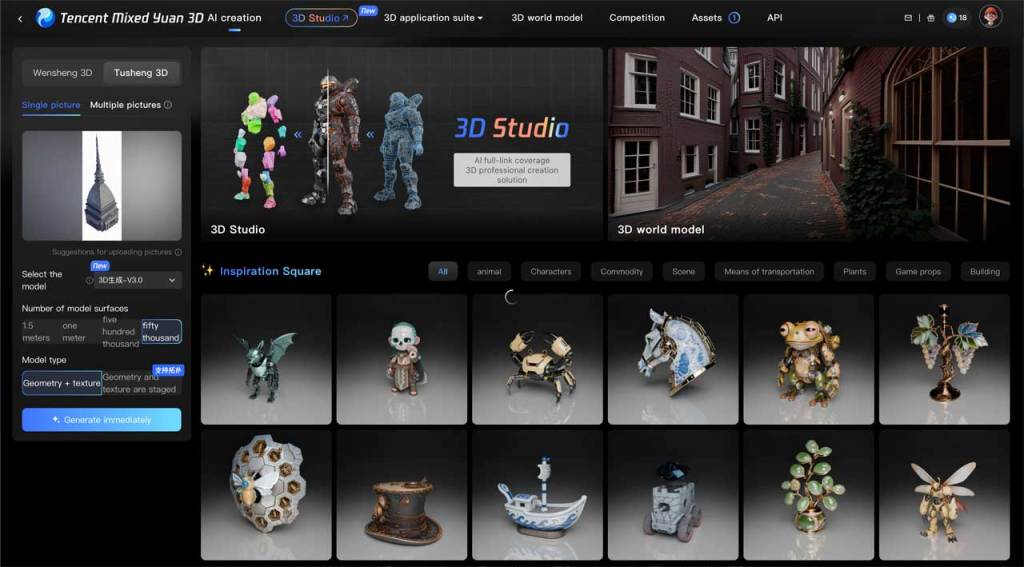
Once generated, you can explore the model directly in the interactive viewer and verify that proportions, textures and shadows are consistent.

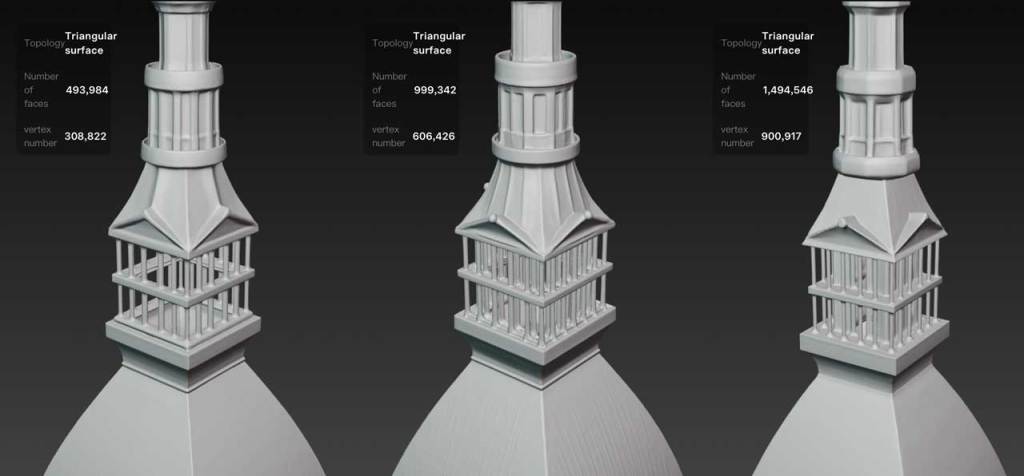
To give an idea of the difference in definition, here is a comparison of three models generated with different levels of detail. At 150k the geometries are softer and simplified, while at 300k and 500k sharper frames, covers and edges emerge.
4. Export the model
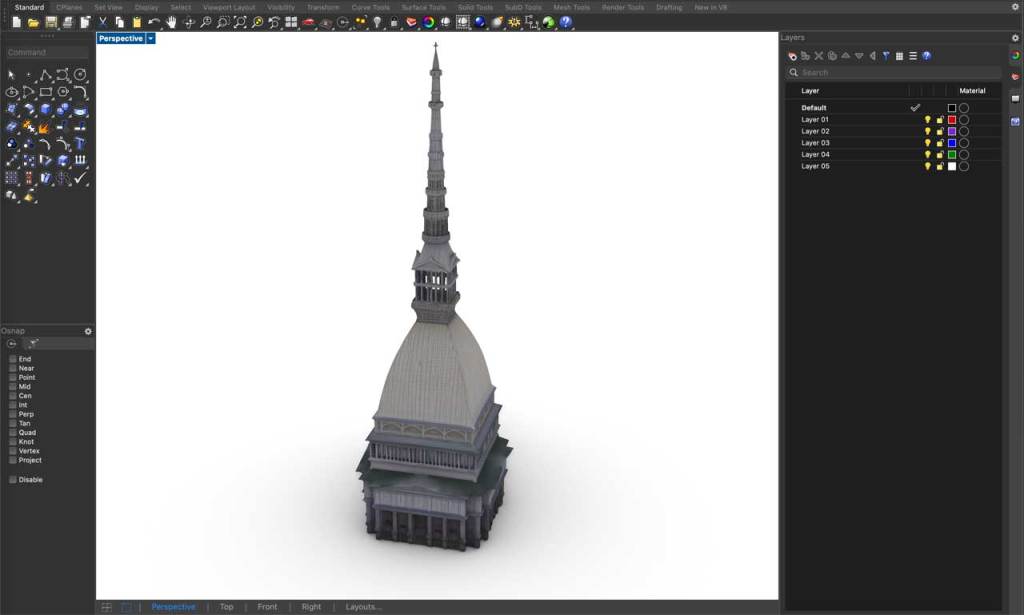
Once you’re satisfied, move on to download. Hunyuan allows you to export in various formats: the most convenient is .glb, which is read natively by Rhino 8. However, if you use previous versions, or prefer to work in other software, choose .obj: it retains the geometry and textures, and opens without problems practically anywhere.
Once the file is downloaded, the model is ready to be imported into Rhino, Blender or any other modeling program.
Expected result (and honest limits)
With this flow you get a three-dimensional model with a texture already mapped in just a few minutes, perfect for mass studies, urban insertions or quick visualizations.
It is not a photogrammetric survey and does not require metric precision, but it is more than sufficient for visual checks, proportions or light simulations. The overall performance depends a lot on the quality of the initial screenshots: the more consistent the views are, the cleaner and more compact the final model will be.
The generated materials are also generally reliable: in more recent versions of Hunyuan the color rendering is improved and artifacts are minimal, especially in flat or repetitive areas.
Why try it
In just a few steps you can build a believable 3D base for any urban context, without expensive plugins or software. It is a new way of understanding visual research: it does not replace surveying, but allows you to test ideas, proportions and spatial relationships very quickly.
A small experiment that could change the way you prepare your next concepts.
The weekly column “Architectural Prompting” is edited by experts Luciana Mastrolia, Giovanna Panucci and Andrea Tinazzo
>> If you are interested in these topics, also sign up to the free Linkedin Newsletter AI & Design for Technicians, we’ll talk about it here!